

Hello.
About year ago or so, I developed my own append breaker, since the one that was released, had many bugs.
The project was not public, and I have sent early beta versions only to specific people. Then, I left the server and let @findouticly maintain the project; he fixed some bugs and made the append breaker online for those who had the link. So there is a huge credit for him.
But now, I am back (unfortunately) and I have decided to continue the project.
You can access it by this link; https://vexosphere.github.io/append-breaker-v2/
How does it work like?
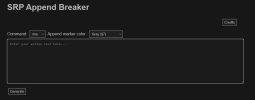
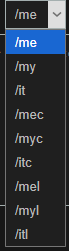
As you can see, it's a really simple program. In the section named "Command" you choose which action you want to have; me, mec, mel etc.
Moving forward, there is section named "Append marker color".
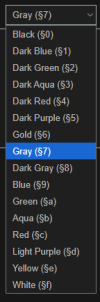
What does it do? It changes the color of quote marks in your action and the [+] thing.
Now for the main part;
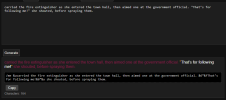
Simply, format your action in the text box with;
test action "test words" test action
DO NOT PUT any color signs like & ! This will do it automatically.
(The default color on the website for the preview is red. However, it puts &u in your actions, so it uses the color you have saved in SchoolRP by /emojicolor command.)
The website does change the formatting basing on what command you use. For example, if you choose /mec, the quote text will be gray, as if it was whispering. If you use /mel, the text will be bold white.
SO YES, YOU DON'T HAVE TO USE ' ' SIGNS INSTEAD OF QUOTE MARKS TO GET GRAY COLOR! Yay!


As you can see, there is characters count on the bottom of block. As you know or not, the max char limit in Minecraft is 256. The website is designed to NEVER cross that limit. And it always leaves free space for command and the color codes.
Okay, but what if you cross the 2 appends?
The website will continue next actions in /it, adding the [+] sign. So it's great for long detailrp!

(The following action was generated by AI, I was too lazy to make the detailrp action, it's just to showcase it!)
So everything you have to do, is simply use the copy button and paste it in game! No formatting, no place for mistakes because of the preview.
That's all.
About year ago or so, I developed my own append breaker, since the one that was released, had many bugs.
The project was not public, and I have sent early beta versions only to specific people. Then, I left the server and let @findouticly maintain the project; he fixed some bugs and made the append breaker online for those who had the link. So there is a huge credit for him.
But now, I am back (unfortunately) and I have decided to continue the project.
You can access it by this link; https://vexosphere.github.io/append-breaker-v2/
How does it work like?
As you can see, it's a really simple program. In the section named "Command" you choose which action you want to have; me, mec, mel etc.
Moving forward, there is section named "Append marker color".
What does it do? It changes the color of quote marks in your action and the [+] thing.
Now for the main part;
Simply, format your action in the text box with;
test action "test words" test action
DO NOT PUT any color signs like & ! This will do it automatically.
(The default color on the website for the preview is red. However, it puts &u in your actions, so it uses the color you have saved in SchoolRP by /emojicolor command.)
The website does change the formatting basing on what command you use. For example, if you choose /mec, the quote text will be gray, as if it was whispering. If you use /mel, the text will be bold white.
SO YES, YOU DON'T HAVE TO USE ' ' SIGNS INSTEAD OF QUOTE MARKS TO GET GRAY COLOR! Yay!
As you can see, there is characters count on the bottom of block. As you know or not, the max char limit in Minecraft is 256. The website is designed to NEVER cross that limit. And it always leaves free space for command and the color codes.
Okay, but what if you cross the 2 appends?
The website will continue next actions in /it, adding the [+] sign. So it's great for long detailrp!
(The following action was generated by AI, I was too lazy to make the detailrp action, it's just to showcase it!)
So everything you have to do, is simply use the copy button and paste it in game! No formatting, no place for mistakes because of the preview.
That's all.
Now, for those who have the same program but with findouticly link; I am not copying it, if you click credits there, you can see I am the original author. I'm simply coming back into the project, hosting it on my own. That means, you can except updates, as I plan a lot.
Again, huge thanks for @findouticly for keeping the project alive while I was gone. And for those who reported bugs to him.
Now, the project is fully public. If you have any bugs, please report them to me on Discord: @Vexosphere
And have fun!


