mc.roleplayhub.com
players online
You are using an out of date browser. It may not display this or other websites correctly.
You should upgrade or use an alternative browser.
You should upgrade or use an alternative browser.
Help with Advanced Chat
- Thread starter GenGelly
- Start date


For that mod Particularly you gotta use 1.21 Fabric as it's not compatible with any other version. I personally play SRP on 1.21 so I can use this mod and it's addons.


Hi hi! I love advanced chat, its super helpful! I'll try to give you a crash course, but if you have questions feel free to dm me, my discord is arkkwolf. Assuming you already have it added, this is a little guide for adding chat windows.
Step 1 - Open chat and go to settings at the bottom right corner

Step 2 - Click "HUD" then "chat tabs" and a blank menu will come up (in my case I already have various windows already set up). Click on new chat tab, and go to the "configure" that appears.
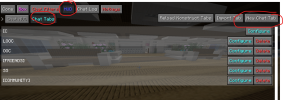
Step 3 - Turn "forward messages to main" to false, name the channel (i.e. OOC) and then go to matches
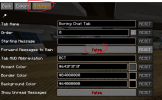
Step 4 - Here you will add "matches" which basically filter which messages come through. In this case, you can add [LOOC] for looc chat or [OOC] for ooc chat.

Step 5 - Exit out of settings and open chat once more. Click the + and the tab you just created, and a window will appear which you can size to your liking.

Step 6 - if you have any more questions please DM me!
Step 1 - Open chat and go to settings at the bottom right corner
Step 2 - Click "HUD" then "chat tabs" and a blank menu will come up (in my case I already have various windows already set up). Click on new chat tab, and go to the "configure" that appears.
Step 3 - Turn "forward messages to main" to false, name the channel (i.e. OOC) and then go to matches
Step 4 - Here you will add "matches" which basically filter which messages come through. In this case, you can add [LOOC] for looc chat or [OOC] for ooc chat.
Step 5 - Exit out of settings and open chat once more. Click the + and the tab you just created, and a window will appear which you can size to your liking.
Step 6 - if you have any more questions please DM me!


If you want to filter really specific things;
http://schoolrp.net/threads/advancedchat-regular-expressions.77245/
http://schoolrp.net/threads/advancedchat-regular-expressions.77245/
Users who are viewing this thread
Total: 1 (members: 0, guests: 1)