mc.roleplayhub.com

players online

List of important commands?

Comment whatever commands you use most often on the server. this includes things like &o for italics or * to indicate an action. How you use these commands in roleplay is also helpful.

I have the memory of a goldfish and I can never remember how to use commands to upgrade my roleplay :(
 
ign + username are same, its like how mine is on the left "80sJeremy"


GENERAL COMMANDS

/me ~ emote / action
/mec ~ /me but quiet
/mel ~ /me but loud
/my ~ (adds an 's to your character ~ "Dan's frown would fade.")
/it ~ used to describe something
/itc ~ /it but quiet
/itl ~ /it but loud
/seen [IGN] how long they've been online/if they are online the server
/findname [Character Name] ~ finds a players IGN based off their characters name
/findrpname [IGN] ~ opposite to the one above
/feed ~ fundraiser+ i think
/looc ~ local out of character w/ text
/ooc ~ global out of character w/ text (you can toggle by just doing /ooc)
/rpname [Character Name] ~ Personal
/setdesc [Description] ~ Personal
/yell 'HELLO!' (quotations not needed, just normal text example)
/whisper 'Hello!' (quotations not needed, just normal text example)
/sit ~ sits down
/lay ~ lays down
/crawl ~ allows you to crawl
/gesture ~ dances
/am ~ animated hands, usually used to "hug" people
/raisehand ~ raises your hand via right clicking
/stroll ~ walks slowly

NOTES
/me waved at the individual "Hey! Hows your day?" he asked.
i believe you can use quotations around text to "make it white" or "speaking text"
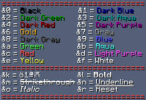
you can optionally add a colorcode to the beginning of the text, or do /emotecolor and select a color from there. I suggest doing /emotecolor. I do however believe you need the lowest rank, Fundraiser ~ $5.00 USD
1779655158176.png

PHONE COMMANDS
/phonenumber ~ /pn shows your current characters phone number
/addcontact [number] [name] ~ allows you to add other contacts
/removecontact ~ removes contacts
/contacts ~ lists your saved contacts
/block [name/number] ~ blocks contacts
/blocked ~ shows a list of blocked numbers
/text ~ [name/number] ~ allows you to text players
YOU ONLY TYPE THE NAME/NUMBER ONCE - IF THEY ANSWER, JUST DO /call [text], /callw [text], /cally [text], etc.
/call [name/number] ~ allows you to call players
/callw [name/number] ~ calling but quiet
/cally [name/number] ~ calling but loud
/langcall [language] [name/number] ~ calling in a lanugage (need to apply for these here)
/langcallw [language] [name/number] ~ calling in a lanugage ~ quiet (need to apply for these here)
/langcally [language] [name/number] ~ calling in a lanugage ~ loud (need to apply for these here)

PROPERTY COMMANDS
/p add [username] ~ adds a player to your property
/p remove [username] ~ removes a player from your property
/p members ~ lists all members of the property
/p addadmin [username] ~ adds an admin to your property
/p removeadmin [username] ~ removes a player from your property
/p admins ~ views all admins of the property
/p addeditor [username] ~ adds an editor to your property
/p removeeditor [username] ~ removes a editor from your property
/p editors ~ views all editors on your property

if you add players to "editor" or "admin" they dont have normal permissions, you must add them normally. (Normal permissions allow players to open unlocked doors + unlocked storage containers
ex.
/p add 80sJeremy
/p addadmin 80sJeremy
/p addeditor 80sJeremy
this allows me to do most commands

VEHICLE COMMANDS
/vehicle pickupall ~ picks all placed vehicles up
/vehicle add [IGN] ~ adds a player to allow them to drive the vehicle
/vehicle remove [IGN] ~ removes a player from allowing them to drive
/vehicle list ~ lists added players to vehicles
/vehicle lock ~ doesnt let other players in passenger seats.


This is where I got a majority of my information from, if you need assistance, please go here!
Frequently Asked Questions | SchoolRP
If you need more assistance, ask in SchoolRP help/Roleplay Hub help channels!
Roleplay Hub Discord
School Roleplay Discord
 
ign + username are same, its like how mine is on the left "80sJeremy"


GENERAL COMMANDS

/me ~ emote / action
/mec ~ /me but quiet
/mel ~ /me but loud
/my ~ (adds an 's to your character ~ "Dan's frown would fade.")
/it ~ used to describe something
/itc ~ /it but quiet
/itl ~ /it but loud
/seen [IGN] how long they've been online/if they are online the server
/findname [Character Name] ~ finds a players IGN based off their characters name
/findrpname [IGN] ~ opposite to the one above
/feed ~ fundraiser+ i think
/looc ~ local out of character w/ text
/ooc ~ global out of character w/ text (you can toggle by just doing /ooc)
/rpname [Character Name] ~ Personal
/setdesc [Description] ~ Personal
/yell 'HELLO!' (quotations not needed, just normal text example)
/whisper 'Hello!' (quotations not needed, just normal text example)
/sit ~ sits down
/lay ~ lays down
/crawl ~ allows you to crawl
/gesture ~ dances
/am ~ animated hands, usually used to "hug" people
/raisehand ~ raises your hand via right clicking
/stroll ~ walks slowly

NOTES
/me waved at the individual "Hey! Hows your day?" he asked.
i believe you can use quotations around text to "make it white" or "speaking text"
you can optionally add a colorcode to the beginning of the text, or do /emotecolor and select a color from there. I suggest doing /emotecolor. I do however believe you need the lowest rank, Fundraiser ~ $5.00 USD
View attachment 92238

PHONE COMMANDS
/phonenumber ~ /pn shows your current characters phone number
/addcontact [number] [name] ~ allows you to add other contacts
/removecontact ~ removes contacts
/contacts ~ lists your saved contacts
/block [name/number] ~ blocks contacts
/blocked ~ shows a list of blocked numbers
/text ~ [name/number] ~ allows you to text players
YOU ONLY TYPE THE NAME/NUMBER ONCE - IF THEY ANSWER, JUST DO /call [text], /callw [text], /cally [text], etc.
/call [name/number] ~ allows you to call players
/callw [name/number] ~ calling but quiet
/cally [name/number] ~ calling but loud
/langcall [language] [name/number] ~ calling in a lanugage (need to apply for these here)
/langcallw [language] [name/number] ~ calling in a lanugage ~ quiet (need to apply for these here)
/langcally [language] [name/number] ~ calling in a lanugage ~ loud (need to apply for these here)

PROPERTY COMMANDS
/p add [username] ~ adds a player to your property
/p remove [username] ~ removes a player from your property
/p members ~ lists all members of the property
/p addadmin [username] ~ adds an admin to your property
/p removeadmin [username] ~ removes a player from your property
/p admins ~ views all admins of the property
/p addeditor [username] ~ adds an editor to your property
/p removeeditor [username] ~ removes a editor from your property
/p editors ~ views all editors on your property

if you add players to "editor" or "admin" they dont have normal permissions, you must add them normally. (Normal permissions allow players to open unlocked doors + unlocked storage containers
ex.
/p add 80sJeremy
/p addadmin 80sJeremy
/p addeditor 80sJeremy
this allows me to do most commands

VEHICLE COMMANDS
/vehicle pickupall ~ picks all placed vehicles up
/vehicle add [IGN] ~ adds a player to allow them to drive the vehicle
/vehicle remove [IGN] ~ removes a player from allowing them to drive
/vehicle list ~ lists added players to vehicles
/vehicle lock ~ doesnt let other players in passenger seats.


This is where I got a majority of my information from, if you need assistance, please go here!
Frequently Asked Questions | SchoolRP
If you need more assistance, ask in SchoolRP help/Roleplay Hub help channels!
Roleplay Hub Discord
School Roleplay Discord
You just saved my life fr! ty this is so helpful!
 

Users who are viewing this thread

Top