

Have you ever had issues with viewing stuff in chat? Do you want to be able to see OOC later, but have it to the side temporarily without turning it all the way off?
Do you want an OOC tab WITHOUT seeing people use /vote ? Or in general remove some annoyances you may see in chat?
You've come to the right place!
I'm going to show you how to create an IC chat tab, as well as an OOC one! You can apply the knowledge here to any other tabs you may want to create, I'm no professional in chat tabs and I'm sure some of my information may be wrong. So this is just a simple guide on how I did it!
just a note, even if you are using chat tabs, you will see your own messages in all tabs regardless of if you've adjusted the settings! so if you use an ic tab, and type in ooc, your ooc message will still appear in your ic tab, but no one else's will!
if you don't want to see ooc at all, you can just turn it off by using " /ooc " in game! This is a guide more specifically for people who don't want to turn it off entirely or would like an ooc tab that doesn't include /vote.
Here is also a visual/video example for those who follow along better that way!
Now, to start off you're going to want to use Feather Client! It's the client that is most connected to SchoolRP and runs the game much better in general, so I 100% recommend it! I'm sure there are other chat tabs mods you could get if you don't want to, though, but this guide is specifically for the chat tab mod built into feather!
here are how my current tabs look in game! As you can see, in the ic I see all of the people talking and actioning! And in ooc, I don't!


(if anyone sees themselves here and wants to be censored lmk LOL, I took these screenshots at random just to show!)
VS my "all" tab! where I see everything at once! which can definitely feel overwhelming.

What you're going to do to first setup, is press escape! open up this menu.
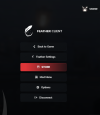
now click on Feather Settings! Then click it once more.
You should open to a menu like this! I normally keep a lot of the things that were on on by default, but you can do a lot of customization here if you'd like to! Like using auto text so you can press a button to do /sit rather than typing it out!
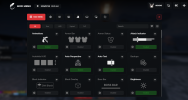
After having this menu open, you're going to search chat tabs ! Open the first option that says custom chat / chat tabs, and then click on the top orange button that says chat tabs!

Now, this is the "hard" part! Actually setting up your tabs. For me it was a bit of trial and error as I'm entirely unfamiliar with it, that's why this is a simple guide! I'm sure others know much more than me about chat tabs and will have an easier time explaining why things work the way they do.
Anyway, click "new tab" at the top right of the tabs screen! Here you'll get to name it and make your first check! in the top right should be the "New Check" button, this is what decides what you can and can't see in your tabs!
There are two ways to set this up, inclusive or exclusive. The names are self explanatory, but for a more clear explanation: If you select inclusive, you will make your check values things you WANT to see in that chat, if you use exclusive you'll be putting stuff you DON'T want to see. This option is not per check and is per the entire tab! so choose what benefits you most.
For my IC Tab, I made it exclusive! This is a lot easier for me than typing out different values I would like it to keep, I don't know too much about regex and just wanted to keep things as simple as possible for myself and others!
I also set the match type to "any", if you set it to all, then ALL checks must be in the same message for it to exclude the message, which isn't ideal at all! for example, say you want to exclude OOC and LOOC, if you put the setting as "All" then it will only delete messages that have BOTH [LOOC] and {OOC] in the message, meaning that if someone in OOC types something, you'll always still see it bc they didn't put [LOOC] anywhere in their message. The setting "Any" means that if the message has ANY of your checks in it, it won't show up at all! and doesn't require both things to be in the message to remove it.
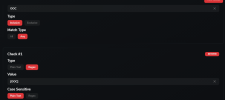
Now, continuing on! This is how I setup my IC Tab and the checks I used! You can add more if you'd like, or less! This is what works best for me.
For my IC Tab, I set it to Exclusive! Setting your tab to exclusive means you'll be making the checks what you DON'T want to see! Since I don't want to see [OOC], I included it as a check here!
Unfortunately because I don't know much about Regex, I can't explain exactly how the "Type" setting works, but if you set it as Plain Text, it doesn't!
Case Sensitive should always be plain text if you are wanting the message to be removed or added to the tab directly how it is! Case Sensitive refers to how the text is processed by your tabs! If something is plain text that means it is taken as you've written it exactly! Regex more so refers to coding I believe, and I don't have much knowledge on that unfortunately!
I also did not remove /looc from my ic tab, you can do this if you'd like, it's all personal preference! If you'd like to do this, just make a new check
set the type to regex, the value to [looc], and Case sensitive to plain text.

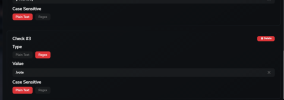
For my OOC I made it an inclusive tab! Still setting the match type to any, though i only have one check as of right now because it's inclusive!
For inclusive settings, you set the checks to what you WANT to see!
Since I want to see [OOC] only, it's my only check!
If you have any questions, leave a comment and I can answer them!
Do you want an OOC tab WITHOUT seeing people use /vote ? Or in general remove some annoyances you may see in chat?
You've come to the right place!
I'm going to show you how to create an IC chat tab, as well as an OOC one! You can apply the knowledge here to any other tabs you may want to create, I'm no professional in chat tabs and I'm sure some of my information may be wrong. So this is just a simple guide on how I did it!
just a note, even if you are using chat tabs, you will see your own messages in all tabs regardless of if you've adjusted the settings! so if you use an ic tab, and type in ooc, your ooc message will still appear in your ic tab, but no one else's will!
if you don't want to see ooc at all, you can just turn it off by using " /ooc " in game! This is a guide more specifically for people who don't want to turn it off entirely or would like an ooc tab that doesn't include /vote.
Here is also a visual/video example for those who follow along better that way!
Now, to start off you're going to want to use Feather Client! It's the client that is most connected to SchoolRP and runs the game much better in general, so I 100% recommend it! I'm sure there are other chat tabs mods you could get if you don't want to, though, but this guide is specifically for the chat tab mod built into feather!
here are how my current tabs look in game! As you can see, in the ic I see all of the people talking and actioning! And in ooc, I don't!
(if anyone sees themselves here and wants to be censored lmk LOL, I took these screenshots at random just to show!)
VS my "all" tab! where I see everything at once! which can definitely feel overwhelming.
What you're going to do to first setup, is press escape! open up this menu.
now click on Feather Settings! Then click it once more.
You should open to a menu like this! I normally keep a lot of the things that were on on by default, but you can do a lot of customization here if you'd like to! Like using auto text so you can press a button to do /sit rather than typing it out!
After having this menu open, you're going to search chat tabs ! Open the first option that says custom chat / chat tabs, and then click on the top orange button that says chat tabs!
Now, this is the "hard" part! Actually setting up your tabs. For me it was a bit of trial and error as I'm entirely unfamiliar with it, that's why this is a simple guide! I'm sure others know much more than me about chat tabs and will have an easier time explaining why things work the way they do.
Anyway, click "new tab" at the top right of the tabs screen! Here you'll get to name it and make your first check! in the top right should be the "New Check" button, this is what decides what you can and can't see in your tabs!
There are two ways to set this up, inclusive or exclusive. The names are self explanatory, but for a more clear explanation: If you select inclusive, you will make your check values things you WANT to see in that chat, if you use exclusive you'll be putting stuff you DON'T want to see. This option is not per check and is per the entire tab! so choose what benefits you most.
For my IC Tab, I made it exclusive! This is a lot easier for me than typing out different values I would like it to keep, I don't know too much about regex and just wanted to keep things as simple as possible for myself and others!
I also set the match type to "any", if you set it to all, then ALL checks must be in the same message for it to exclude the message, which isn't ideal at all! for example, say you want to exclude OOC and LOOC, if you put the setting as "All" then it will only delete messages that have BOTH [LOOC] and {OOC] in the message, meaning that if someone in OOC types something, you'll always still see it bc they didn't put [LOOC] anywhere in their message. The setting "Any" means that if the message has ANY of your checks in it, it won't show up at all! and doesn't require both things to be in the message to remove it.
Now, continuing on! This is how I setup my IC Tab and the checks I used! You can add more if you'd like, or less! This is what works best for me.
For my IC Tab, I set it to Exclusive! Setting your tab to exclusive means you'll be making the checks what you DON'T want to see! Since I don't want to see [OOC], I included it as a check here!
Unfortunately because I don't know much about Regex, I can't explain exactly how the "Type" setting works, but if you set it as Plain Text, it doesn't!
Case Sensitive should always be plain text if you are wanting the message to be removed or added to the tab directly how it is! Case Sensitive refers to how the text is processed by your tabs! If something is plain text that means it is taken as you've written it exactly! Regex more so refers to coding I believe, and I don't have much knowledge on that unfortunately!
I also did not remove /looc from my ic tab, you can do this if you'd like, it's all personal preference! If you'd like to do this, just make a new check
set the type to regex, the value to [looc], and Case sensitive to plain text.
For my OOC I made it an inclusive tab! Still setting the match type to any, though i only have one check as of right now because it's inclusive!
For inclusive settings, you set the checks to what you WANT to see!
Since I want to see [OOC] only, it's my only check!
If you have any questions, leave a comment and I can answer them!
Last edited:


